When centering a div I usually use margin: 0 auto; but recently I found that sometimes this does not work in IE9. Instead, IE9 ignores the auto margins and puts everything on the left. Here's how to solve this problem.
Problem: IE9 does not center divs when using auto margins.
Impact: The layout looks messed up and can be a little hard to read if everything is out of line.
Solution:
When setting auto margins don't work for centering a div, use text-align instead. In your CSS, set the text-align for the parent to center and set the child div's (the centered div) text-align property to left.
In other words, if you want to center a div of the CSS class "mydiv" within the body of a page, put the following in your CSS:
body {
text-align: center; /* so all content in the body is centered */
}
.mydiv {
text-align: left; /* so the content isn't centered as well */
}
Your div should now be centered on the page.
Showing posts with label CSS. Show all posts
Showing posts with label CSS. Show all posts
Saturday, March 31, 2012
Prevent parent divs from collapsing under floated child divs
Labels:
collapsing div,
CSS
0
comments
Sometimes when nesting a floating div, the child div overlaps the end of the parent div like in the image below. But what do you do when you want the child div to stay within the parent div?
Problem: The child div doesn't stay fully within the parent div.
Impact: The layout can get ruined (for instance, when using a border at the bottom of the parent div) when overlapping occurs.
Solution:
This problem occurs when the child div is floated but the parent is not. In your CSS, simply add float: left; or float: right; to your parent div's styling, whichever is appropriate. This will make sure the parent div stretches to encompass the child div.
 |
| Figure 1: The child div extends past the parent div (BAD!). |
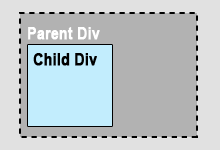 |
| Figure 2: The child div is nested within the parent div (GOOD!). |
Impact: The layout can get ruined (for instance, when using a border at the bottom of the parent div) when overlapping occurs.
Solution:
This problem occurs when the child div is floated but the parent is not. In your CSS, simply add float: left; or float: right; to your parent div's styling, whichever is appropriate. This will make sure the parent div stretches to encompass the child div.

Subscribe to:
Posts (Atom)


